

Homework has many benefits for students including learning how to work independently, staying organised and taking responsibility for their part in the educational process. It also gives them a chance to review the lesson and go over the material again.
Assignments give teachers the ability to track student progress and to see if the student understands the lesson content.
Microsoft’s Office 365 now provides another educational tool in their arsenal of productivity apps. Teams is a collaboration tool for your classes with the ability to have discussion threads, document sharing, class notebooks (see my previous post) and assignments.
In this post I’m going to focus on the assignment aspect of teams. You can follow the video guide or the blog post below, I hope this helps you get the most out of Microsoft Teams!
How to view assignments for your class
Inside your class, click on the “Assignments” tab to view a timeline of all the set assignments for this group.

You can select either a horizontal or vertical timeline view of the assignments using the view selector (highlighted yellow below).

How to create a new assignment
To start setting work for students, click the “New assignment” button.

You are then prompted to enter the details of the new assignment

- Assign to: Select which classes to assign to (you can set it to more than one of your classes here!)
- Title: This is the title of the assignment.
- Instructions: Include a description here to help the student complete the assignment.
- Due date and time: When the assignment becomes late (you have the option to allow late hand-in below)
- Late turn-in allowed: If this is enabled, students can still hand-in work after the due date. This is required if you are using class notebook pages.
- Points: Turn this on to allow a mark allocation. Currently these are only available as a number score.
Documents can be added from OneDrive, your computer or from the OneNote Class Notebook. We are hopeful that SharePoint and other class teams will be added to this soon! There are two options for attaching these resources.
Attach reference materials
These documents are for the student to view as part of the assignment. You might include a PowerPoint, links to useful websites, etc.
Specify what students will turn in
Documents uploaded in this section can be edited by the student and submitted back as part of the assignment. This is particularly useful for things like worksheets.
When you have finished the assignment, you can either save it as a draft or assign it to the class. As soon as this is assigned to the class, it will appear in their assignment timeline and they will get a notification on their team mobile and desktop apps.

How to review completed assignments
Use the review button to bring up the assignment timeline and assignment submissions.

Select the relevant assignment from the timeline to show the student work.

Each student has:
- Student work: Links to files that the student has returned.
- Date turned in: The date and time that the student submitted their assignment.
- Feedback: Some written feedback for the student.
- Points: If you have chosen to enable this in your assignment, you can give the student a grade.
Students will not be able to see your feedback or grade until the “Post” button is clicked.

Click the “Export to Excel” button to download a spreadsheet of the assignments.


The grades spreadsheet shows all the assignments set to this class over the school year. It optionally shows grades, if enabled per assignment. No more manual marksheets! You could use this data to import or fill in MIS marksheets quicker.
Mobile Apps
One of the best ways to engage with students both inside and outside of school using Teams is to encourage them to use the mobile app. Students get instant notifications of any mentions, homework or graded assignments.

Teams automation and customisation
Teams is free for schools, check you have the license enabled to start using it. At Cloud Design Box, we can provision teams from MIS data and create an engaging and simple dashboard to access team data in SharePoint. We can also create student folders inside team sites and extend the experience even further, making it easier and increasing student and teacher engagement. You can find out more information on our website https://clouddesignbox.co.uk/.


Hi Tony, we have a subscription with Cloud Design Box and I am mostly understanding Teams assignments but we are a bit confused of where the documents are stored after the work has been submitted and marked? Should students save a copy in their own onedrive or sharepoint, so they can access later? Currently I can only see the submitted files by going to site contents in sharepoint>student work>working files>student folders and it does not appear if I simply go to Documents>General>Student work>student folders.The teachers are receiving automated emails from sharepoint to say that a number of files have been deleted – I can see many in the recycle bin but they mostly seem to be the reference documents that are also uploaded to the Teams assignment? Apparently they receive the automated email soon after they have graded the student assignments on Teams. Thanks in advance!
Hi Steph,
Hope you are safe and well. I’ve emailed you back through the Cloud Design Box helpdesk.
Teachers shouldn�t really be messing around with the backend � it will break the assignments app.
All resources and submitted work should be accessed through the assignment app rather than the document libraries in SharePoint that it uses for storage.
At the end of the academic year, the classes are archived (making them read-only) so students will still have access to previous years work without having to download it and copy into their OneDrive.
They can always open the document in the assignment app and save it to their OneDrive but really you want to keep things as simple as possible for the students.
Teachers are getting the automated email because the assignment app is deleting documents from the in progress folder and adding it to the completed folder in the background. That sounds like a SharePoint bug as it shouldn’t be notifying you about this so I’ll let Microsoft know.
Thanks,
Tony
Hi Tony, we have a subscription with Cloud Design Box and I am mostly understanding Teams assignments but we are a bit confused of where the documents are stored after the work has been submitted and marked? Should students save a copy in their own onedrive or sharepoint, so they can access later? Currently I can only see the submitted files by going to site contents in sharepoint>student work>working files>student folders and it does not appear if I simply go to Documents>General>Student work>student folders.The teachers are receiving automated emails from sharepoint to say that a number of files have been deleted – I can see many in the recycle bin but they mostly seem to be the reference documents that are also uploaded to the Teams assignment? Apparently they receive the automated email soon after they have graded the student assignments on Teams. Thanks in advance!
Hi Steph,
Hope you are safe and well. I’ve emailed you back through the Cloud Design Box helpdesk.
Teachers shouldn�t really be messing around with the backend � it will break the assignments app.
All resources and submitted work should be accessed through the assignment app rather than the document libraries in SharePoint that it uses for storage.
At the end of the academic year, the classes are archived (making them read-only) so students will still have access to previous years work without having to download it and copy into their OneDrive.
They can always open the document in the assignment app and save it to their OneDrive but really you want to keep things as simple as possible for the students.
Teachers are getting the automated email because the assignment app is deleting documents from the in progress folder and adding it to the completed folder in the background. That sounds like a SharePoint bug as it shouldn’t be notifying you about this so I’ll let Microsoft know.
Thanks,
Tony
Hi, I want to move an assignment to Graded ( even though not all students have submitted a response). It is well past due and my assignment list is getting very full. How can I move it from the students� list of assignments? Thank you!
Hi,
You can do that by selecting all assignments and clicking “Return”

Thanks,
Tony
Hi, I want to move an assignment to Graded ( even though not all students have submitted a response). It is well past due and my assignment list is getting very full. How can I move it from the students� list of assignments? Thank you!
Hi,
You can do that by selecting all assignments and clicking “Return”

Thanks,
Tony
Hello! I have uploaded a word document as an assignment and made sure to make it so “students can edit” – yet they are not able to do so on a phone or ipad, but can if they are on a computer. Am I doing something wrong? I can’t figure out the issue! Thanks in advance.
Do they have the office apps installed? I’m able to do this from my Android phone. If they do have the apps installed, it is worth logging a support ticket with Microsoft.
Hello! I have uploaded a word document as an assignment and made sure to make it so “students can edit” – yet they are not able to do so on a phone or ipad, but can if they are on a computer. Am I doing something wrong? I can’t figure out the issue! Thanks in advance.
Do they have the office apps installed? I’m able to do this from my Android phone. If they do have the apps installed, it is worth logging a support ticket with Microsoft.
Hi Tony, I have created, but not fully finished, a quiz assignment for my students (in Forms). Now when I open in Drafts, I can�t edit it, only assign it. What should I do?
Hi Deesi,
I don’t think you can edit the quiz once it is in the assignment. You will need to go back to forms and update the quiz and then reattach to a new assignment.
Tony
Hi Tony, I have created, but not fully finished, a quiz assignment for my students (in Forms). Now when I open in Drafts, I can�t edit it, only assign it. What should I do?
Hi Deesi,
I don’t think you can edit the quiz once it is in the assignment. You will need to go back to forms and update the quiz and then reattach to a new assignment.
Tony
Hi Tony,
I have created an assignment and want to attach a video for them to watch first and then a Forms Quiz to take after the video. But if I attach the video link first I can’t seem to attach the quiz, and if I create the quiz first it doesn’t allow me to attach anything else to the assignment. Is there a way to do this? I want it all in one assignment.
Hi Kren,
Maybe you could link the video in your quiz instead?
Thanks,
Tony
Hi Tony,
I have created an assignment and want to attach a video for them to watch first and then a Forms Quiz to take after the video. But if I attach the video link first I can’t seem to attach the quiz, and if I create the quiz first it doesn’t allow me to attach anything else to the assignment. Is there a way to do this? I want it all in one assignment.
Hi Kren,
Maybe you could link the video in your quiz instead?
Thanks,
Tony
Hi Tony,
I am creating 2 or 3 assignments a day for primary age pupils. I find putting them in subjects is clearer for them.
However, it does mean that after a few days there is quite a long list of assignments. Is there any way of hiding or archiving them without actually deleting them?
Thank you for your help.
Hi Joanne,
When the assignment is complete, are you collecting them back in so they appear under the “Completed” list? That should tidy up the list and only show open assignments.
If you do want lots of open assignments, the only way to currently group these together is to have a different team for each subject.
Thanks,
Tony
Hi Tony,
I am creating 2 or 3 assignments a day for primary age pupils. I find putting them in subjects is clearer for them.
However, it does mean that after a few days there is quite a long list of assignments. Is there any way of hiding or archiving them without actually deleting them?
Thank you for your help.
Hi Joanne,
When the assignment is complete, are you collecting them back in so they appear under the “Completed” list? That should tidy up the list and only show open assignments.
If you do want lots of open assignments, the only way to currently group these together is to have a different team for each subject.
Thanks,
Tony
Hi Tony
Is it possible that students see the assignments turned in by other students and simply copy their work?
Thanks for your answer!
No this is not possible
Hi Tony
Is it possible that students see the assignments turned in by other students and simply copy their work?
Thanks for your answer!
No this is not possible
Greetings,
After an MS Form-based quiz closes (which is later than the due date; to allow late turn-ins), can the students; who did not attempt, be able to view that quiz after the closing time?
Thanks!
They could view it in Forms but not as part of the assignment (e.g. with grades being added to the gradebook). That is what i think will happen, never tried it before.
Tony
Greetings,
After an MS Form-based quiz closes (which is later than the due date; to allow late turn-ins), can the students; who did not attempt, be able to view that quiz after the closing time?
Thanks!
They could view it in Forms but not as part of the assignment (e.g. with grades being added to the gradebook). That is what i think will happen, never tried it before.
Tony
when a student is responding to a quiz and overpass the overdue time what will happen to his answers.. can he still able to submit his answers…
If the assignment has ended, they will no longer be able to submit the quiz with the marks going into the markbook.
Tony
when a student is responding to a quiz and overpass the overdue time what will happen to his answers.. can he still able to submit his answers…
If the assignment has ended, they will no longer be able to submit the quiz with the marks going into the markbook.
Tony
Hi Tony,
I have set up tags for classes within my year group. Is there a way that I can use the tag to assign an assignment? Eg Year 9 team but want to assign a quiz using tag @9P rather than having to select individual students. Thank you! Susan
I’m not sure what you mean. Do you mean you have two different groups within your class team that need different assignments? If that is the case you can pick student individually or it might be more efficient to have two separate class teams and keep the work seperate.
Thanks,
Tony
Hi Tony,
I have set up tags for classes within my year group. Is there a way that I can use the tag to assign an assignment? Eg Year 9 team but want to assign a quiz using tag @9P rather than having to select individual students. Thank you! Susan
I’m not sure what you mean. Do you mean you have two different groups within your class team that need different assignments? If that is the case you can pick student individually or it might be more efficient to have two separate class teams and keep the work seperate.
Thanks,
Tony
Hi Thanks for the video !
I work with teachers and they keep asking me if there is a way, after the assignement or quiz is done and graded, that the students cannot see the evaluation. Can we stop sharing the evaluations with our groupe after a certain period of time ? I can’t find the answer in the microsoft resources online.
Thank you in advance !
Val�rie
Hi Val�rie,
I don’t think this is possible. I believe this is setup so that students can transparently see comments and grades. Is there a reason why you would want to hide feedback?
Thanks,
Tony
Hi Thanks for the video !
I work with teachers and they keep asking me if there is a way, after the assignement or quiz is done and graded, that the students cannot see the evaluation. Can we stop sharing the evaluations with our groupe after a certain period of time ? I can’t find the answer in the microsoft resources online.
Thank you in advance !
Val�rie
Hi Val�rie,
I don’t think this is possible. I believe this is setup so that students can transparently see comments and grades. Is there a reason why you would want to hide feedback?
Thanks,
Tony
Hi Tony,
Just started using Teams and assignments, some of my pupils are not submitting work back in to assignments (they are hand writing work and emailing me photos). Is there any way I can attach these? I know the pupils can, but they are primary aged and some find the technology a bit tricky.
Thanks
Jon
Hi Jon,
I don’t think that is possible, however you can still comment and grade the work without them submitting it back to you.
Thanks,
Tony
That’s great, thanks for the reply
Hi Tony,
Just started using Teams and assignments, some of my pupils are not submitting work back in to assignments (they are hand writing work and emailing me photos). Is there any way I can attach these? I know the pupils can, but they are primary aged and some find the technology a bit tricky.
Thanks
Jon
Hi Jon,
I don’t think that is possible, however you can still comment and grade the work without them submitting it back to you.
Thanks,
Tony
That’s great, thanks for the reply
sir my assgnment is submitted but i dont turn in(as it is automatically turn in on my teacher side) but she says it has not turn in on her side…can it be viewed to my teacher??
Hi Hamad,
If your teacher collected your assignment in without you submitting it, she should still be able to see what you had started working on during that assignment.
Thanks,
Tony
sir my assgnment is submitted but i dont turn in(as it is automatically turn in on my teacher side) but she says it has not turn in on her side…can it be viewed to my teacher??
Hi Hamad,
If your teacher collected your assignment in without you submitting it, she should still be able to see what you had started working on during that assignment.
Thanks,
Tony
Hi,
I’ve only recently started using assignments with my primary children. I did not use quiz as I wanted them to write full answers. They submitted them, I marked them with detailed comment for each answer and returned them to the children. They say they can only see my main comment and not actually open the assignment to see the specific comments. I would like them to make corrections so I can check their progress. How do I do this? Thank you.
Hi Kerry,
Great to hear you are using assignments! You will need to make sure you return it back to them before they can see your comments and make changes to the document. You can do this from within the marksheet by selecting all the students and pressing “Return”.
Thanks,
Tony
Hi,
I’ve only recently started using assignments with my primary children. I did not use quiz as I wanted them to write full answers. They submitted them, I marked them with detailed comment for each answer and returned them to the children. They say they can only see my main comment and not actually open the assignment to see the specific comments. I would like them to make corrections so I can check their progress. How do I do this? Thank you.
Hi Kerry,
Great to hear you are using assignments! You will need to make sure you return it back to them before they can see your comments and make changes to the document. You can do this from within the marksheet by selecting all the students and pressing “Return”.
Thanks,
Tony
Hi I am new to teams, I was wondering if there is a way to send a reminder to all students that are not completing maths work? if so how do I do this?
how do you remove marked work when students haven’t completed this?
Hi Fiona,
You could send the class a reminder or individual students under the “Posts” tab. Try mentioning their names using the @ symbol. This would sent them a notification if they have the app installed otherwise they will get an email within 2 hours.
Thanks,
Tony
Hi I am new to teams, I was wondering if there is a way to send a reminder to all students that are not completing maths work? if so how do I do this?
how do you remove marked work when students haven’t completed this?
Hi Fiona,
You could send the class a reminder or individual students under the “Posts” tab. Try mentioning their names using the @ symbol. This would sent them a notification if they have the app installed otherwise they will get an email within 2 hours.
Thanks,
Tony
Hi, A colleague has created an assignment for her class. She wants to share the assignment with me so I can add it to my class. She was able to copy the link and I posted in �posts� but I couldn�t get it to set up in assignments for my class. Can this be done?
Hi Leonie,
They would have to add you as a teacher to their class (the one with the assignment set). You can then use the “From existing” option when creating a new assignment and reuse the assignment from the other teacher’s class.
Thanks,
Tony
Hi, A colleague has created an assignment for her class. She wants to share the assignment with me so I can add it to my class. She was able to copy the link and I posted in �posts� but I couldn�t get it to set up in assignments for my class. Can this be done?
Hi Leonie,
They would have to add you as a teacher to their class (the one with the assignment set). You can then use the “From existing” option when creating a new assignment and reuse the assignment from the other teacher’s class.
Thanks,
Tony
Can you add “Student ID ” column to export to excel sheet in Assignment tab?
I’m not aware of that option, maybe one to add to UserVoice
Can you add “Student ID ” column to export to excel sheet in Assignment tab?
I’m not aware of that option, maybe one to add to UserVoice
Is there a way for my student to view his submitted test in OneNote? My students are doing their test but once they submit them I can�t see them on my end. If it�s a way for them to see the time and date they submitted them this will help me understand if the problem is on my end or theirs..
Hi Sage,
Hope you are well. They should be able to see the submitted test once you have returned it to them in the Assignments tab under completed section. It won’t be available in OneNote.
Thanks,
Tony
Is there a way for my student to view his submitted test in OneNote? My students are doing their test but once they submit them I can�t see them on my end. If it�s a way for them to see the time and date they submitted them this will help me understand if the problem is on my end or theirs..
Hi Sage,
Hope you are well. They should be able to see the submitted test once you have returned it to them in the Assignments tab under completed section. It won’t be available in OneNote.
Thanks,
Tony
Our school is returning to work so I would like to globally change all of the close dates instead of opening all 30 of my classes and go through the manual procedure to do so . Is that possible within TEAMS? If so how can I do it. If not which additional application would allow me to do that? LMS365?
Hi David,
Hope you are well. I’m not sure if that is possible out-of-the-box or with third party applications (that I am aware of). There are APIs to do this but I’m not sure if Teacher Dashboard or LMS365 use Microsoft Teams Assignments, that would be a question you would have to ask them.
Thanks,
Tony
Our school is returning to work so I would like to globally change all of the close dates instead of opening all 30 of my classes and go through the manual procedure to do so . Is that possible within TEAMS? If so how can I do it. If not which additional application would allow me to do that? LMS365?
Hi David,
Hope you are well. I’m not sure if that is possible out-of-the-box or with third party applications (that I am aware of). There are APIs to do this but I’m not sure if Teacher Dashboard or LMS365 use Microsoft Teams Assignments, that would be a question you would have to ask them.
Thanks,
Tony
One of my pupils wants to upload a video they have made as a response to an Assignment I set for them. How can they do this?
Hi Seonaid,
It really depends how they did this. If they are using a phone, they should be able to select the video in the Teams app when submitting the assignment. If it is on a laptop they will be able to do the same thing.
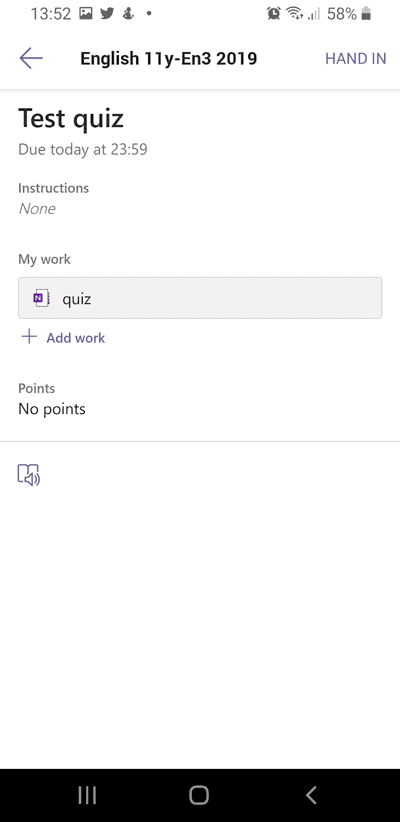

Please note that there is a limit of 50Mb uploads so if it is a large video they might need to store it somewhere else and send you the link.
Thanks,
Tony
One of my pupils wants to upload a video they have made as a response to an Assignment I set for them. How can they do this?
Hi Seonaid,
It really depends how they did this. If they are using a phone, they should be able to select the video in the Teams app when submitting the assignment. If it is on a laptop they will be able to do the same thing.


Please note that there is a limit of 50Mb uploads so if it is a large video they might need to store it somewhere else and send you the link.
Thanks,
Tony
Hi Tony,
I’m wondering if it’s possible to avoid the option of ‘late turn-ins’, and set test submitions otherwise (= no late submissions allowed).
I’ve already prepared a couple of tests and set very specific due dates and hours, and each time late hand-ins were actually available to my students.
I’d appreciate some advice, especially that the exam time’s approaching.
Best,
Joanna
Hi Joanna,
Good question, you can avoid late hand-ins by setting a close date.
1. Click “Edit” under date due
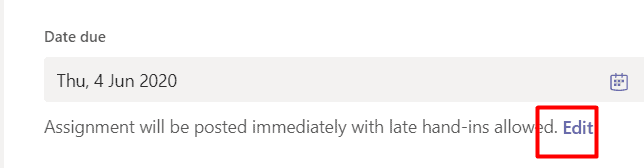
2. Select a close date to prevent late submission
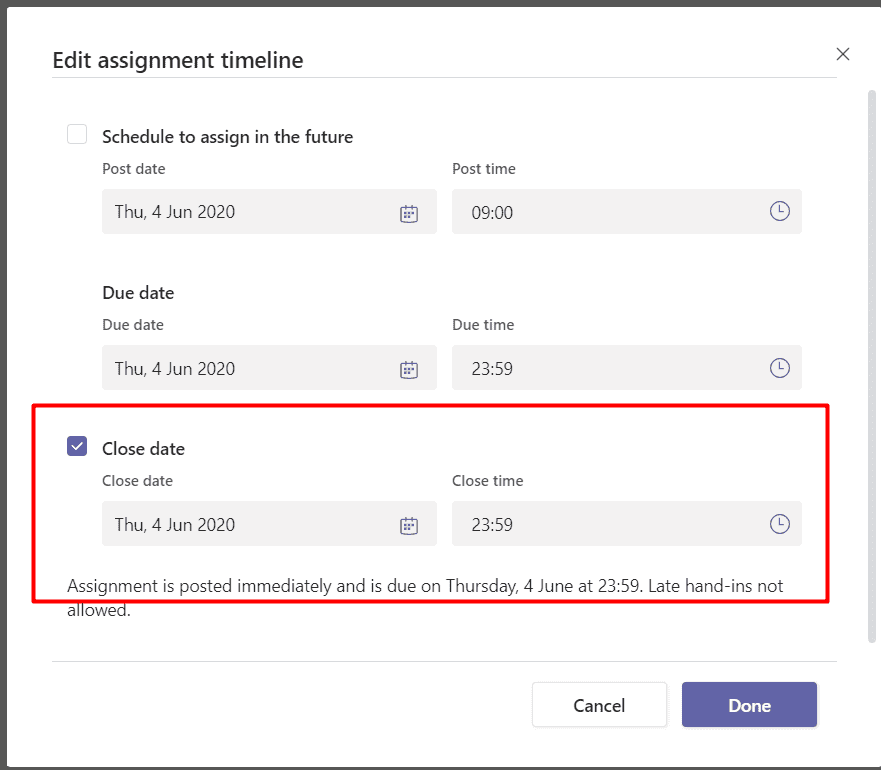
Hope that helps,
Tony
Hi Tony,
I’m wondering if it’s possible to avoid the option of ‘late turn-ins’, and set test submitions otherwise (= no late submissions allowed).
I’ve already prepared a couple of tests and set very specific due dates and hours, and each time late hand-ins were actually available to my students.
I’d appreciate some advice, especially that the exam time’s approaching.
Best,
Joanna
Hi Joanna,
Good question, you can avoid late hand-ins by setting a close date.
1. Click “Edit” under date due

2. Select a close date to prevent late submission

Hope that helps,
Tony
Hi Tony,
I have a student who wants to use the Teams mobile app. However, when they click on their assignment they can’t edit the assignment even though the assignment permits ‘student to edit their own copy’.
Are there limitations to what students can do on the mobile app? (E.g. can they only take a photo of a written assignment or can they edit their work online like they can on the desktop version?)
Thanks, Amy
Hi Amy,
It might depend on their device. On my Android phone, I can create word documents and submit them as part of my assignment. I’m not sure if it is the same experience with an iPhone. Was the resource an editable office document? An older version of office document (like .doc) might not work on mobiles. Did the student have the correct application installed to edit the document (e.g. Word, PowerPoint)?
Thanks,
Tony
Hi Tony,
I have a student who wants to use the Teams mobile app. However, when they click on their assignment they can’t edit the assignment even though the assignment permits ‘student to edit their own copy’.
Are there limitations to what students can do on the mobile app? (E.g. can they only take a photo of a written assignment or can they edit their work online like they can on the desktop version?)
Thanks, Amy
Hi Amy,
It might depend on their device. On my Android phone, I can create word documents and submit them as part of my assignment. I’m not sure if it is the same experience with an iPhone. Was the resource an editable office document? An older version of office document (like .doc) might not work on mobiles. Did the student have the correct application installed to edit the document (e.g. Word, PowerPoint)?
Thanks,
Tony
Hi Tony,
Thank you for your reply. The student didn’t provide a lot of information on why they couldn’t edit the work.
The issue seemed to be when the student opened their assignment (a Word document) they could open the document but they were unable to click on any text boxes and fill in their answers.
I wasn’t sure if the issue was because of limitations to the mobile app.
Thanks,
Amy
Hi Amy,
I’m not sure what you mean by textbox, that might be a more advanced feature which might not be available on mobile?
It might be worth trying to make your word documents with a gap for them to fill in their answer instead (I’m just guessing without looking).
We have some free training events coming up which your colleagues might be interested in, please feel free to share this link with them MS Global Training Partner Event
Thanks,
Tony
Hi Tony,
Thank you for your reply. The student didn’t provide a lot of information on why they couldn’t edit the work.
The issue seemed to be when the student opened their assignment (a Word document) they could open the document but they were unable to click on any text boxes and fill in their answers.
I wasn’t sure if the issue was because of limitations to the mobile app.
Thanks,
Amy
Hi Amy,
I’m not sure what you mean by textbox, that might be a more advanced feature which might not be available on mobile?
It might be worth trying to make your word documents with a gap for them to fill in their answer instead (I’m just guessing without looking).
We have some free training events coming up which your colleagues might be interested in, please feel free to share this link with them MS Global Training Partner Event
Thanks,
Tony
When a student turns in their work they often take a photo of their exercise books and attach these. How can i edit it in teams
Hi Maureen,
It isn’t possible to edit a photo or PDF document online. However if you set it as a class notebook page assignment and students insert their photo into a page in their class notebook section, you can add text or ink over it. https://clouddesignbox.co.uk/transform-student-engagement-with-digital-ink
Thanks,
Tony
When a student turns in their work they often take a photo of their exercise books and attach these. How can i edit it in teams
Hi Maureen,
It isn’t possible to edit a photo or PDF document online. However if you set it as a class notebook page assignment and students insert their photo into a page in their class notebook section, you can add text or ink over it. https://clouddesignbox.co.uk/transform-student-engagement-with-digital-ink
Thanks,
Tony
Hi Tony- I am setting up a Team for a whole Year Group which will consist of 4 classes and 4 different teachers. What is the best way to do this – they are all following the same work and assignments. I am thinking to create a tag for each class eg 9A- assign pupils to their class and then set the assignments for the tagged classes?
I would recommend against setting up a class for a whole year group. If you have over 50 students in a class team, you may experience problems with OneNote syncing (due to the amount of sections) and assignments distributing.
Ideally keep them as 4 separate class teams (add all teachers to all classes if needed).
Thanks,
Tony
Hi Tony- I am setting up a Team for a whole Year Group which will consist of 4 classes and 4 different teachers. What is the best way to do this – they are all following the same work and assignments. I am thinking to create a tag for each class eg 9A- assign pupils to their class and then set the assignments for the tagged classes?
I would recommend against setting up a class for a whole year group. If you have over 50 students in a class team, you may experience problems with OneNote syncing (due to the amount of sections) and assignments distributing.
Ideally keep them as 4 separate class teams (add all teachers to all classes if needed).
Thanks,
Tony